How to Restore Military Photos and Portraits
Military Photos Carry Extraordinary Weight
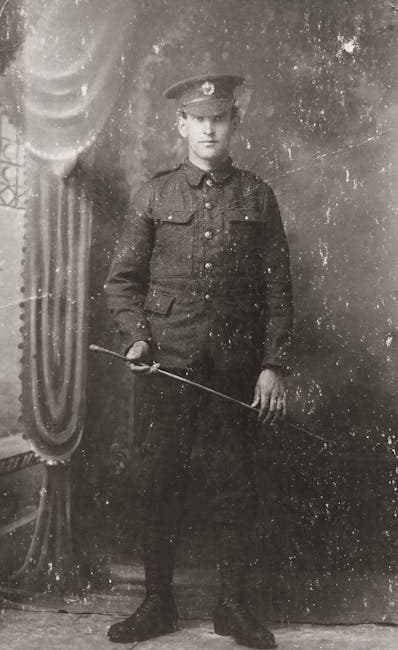
Military photographs are among the most emotionally significant images a family can possess. A grandfather's WWII service portrait. A mother's boot camp graduation photo. A great-uncle's photo from Korea that no one in the family ever met. These images represent sacrifice, service, and a connection to history that transcends the personal.
They also tend to be among the most damaged. Military photos have been carried in wallets, stored in footlockers, shipped across oceans, and kept in conditions that no archivist would approve of. This guide covers how to restore them with the care they deserve.
Common Damage in Military Photos
Era-Specific Issues
World War I (1914-1918): Photos from this era are often cabinet cards or small prints on thick cardboard. They've had over a century to degrade. Expect severe yellowing, silver mirroring, and brittleness. Many are sepia-toned.
World War II (1939-1945): The most common military photos in family collections. B&W prints of varying quality — studio portraits are usually excellent; field photos may be small, blurry, or damaged by the conditions of war. Water damage is common from humid Pacific theaters.
Korean War (1950-1953): Similar to WWII photography but often smaller format. Many photos are candid snapshots rather than formal portraits.
Vietnam War (1965-1975): Mix of B&W and early color. Color prints from this era are highly susceptible to fading — the pink/red cast is nearly universal. Kodachrome slides from Vietnam are often in better condition than prints.
Gulf War and Later (1990+): Color film and early digital. Generally in better condition but still subject to fading and storage damage.
Physical Damage
Military photos endure unique physical stress:
- Wallet wear — many service members carried a photo in their wallet for years
- Humidity and heat — tropical deployments, unconditioned barracks, and field storage
- Mold — footlockers and storage boxes in damp conditions
- Folding — photos folded to fit in pockets or envelopes
- Adhesive damage — tape, glue, and magnetic album residue
Scanning Military Photos
Handle with Extra Care
Military photos may be the only copy in existence. There was no cloud backup in 1944.
- Wear cotton gloves when handling originals
- If the photo is brittle, lay it on the scanner glass rather than sliding it
- For mounted photos (on cardboard backing), scan the entire mount
- If a photo is folded, do not attempt to unfold a brittle print — scan it folded and note the fold line for the AI
Recommended Settings
- 600 DPI — military portraits deserve the highest quality scan
- Full color — even for B&W photos
- TIFF or PNG — lossless format preserves every detail
Restoration Workflow for Military Photos
Step 1: General Restoration
Upload your scan to the restore tool. The AI handles the full range of military photo damage:
- Removes scratches and scuffs from decades of handling
- Corrects yellowing and fading
- Eliminates water stains and mold damage
- Repairs fold lines and creases
- Normalizes contrast and tonal range
Step 2: Face Restoration
Military portraits are all about the person. Run the restored image through the face restore tool to:
- Sharpen facial features that have degraded over decades
- Reconstruct eyes and expression
- Recover uniform detail near the face (collar insignia, medals, name tags)
Step 3: Colorization
B&W military photos are powerful in color. The colorize tool is particularly good with military images because:
- Uniform colors are known — Army olive drab, Navy blues, Marine greens, Air Force blues. The AI has been trained on historical military imagery.
- Setting context helps — barracks, mess halls, parade grounds, and field environments have recognizable color palettes
- Skin tones anchor the image — the AI produces natural skin tones that bring the portrait to life
Seeing a WWII-era grandparent in full color for the first time is an emotional experience for many families.
Step 4: Upscaling
Military photos are often small — passport-sized, wallet-sized, or 3x5 prints. For framing or memorial display, use the upscale tool to enlarge:
- 2x for standard 8x10 framing
- 4x for large memorial displays
Special Considerations
Group Photos and Unit Portraits
Large group photos (company, platoon, or unit portraits) are challenging because individual faces are very small. Strategy:
- Restore and upscale the full group photo
- Crop individual faces from the upscaled version
- Run individual crops through face restore for detail enhancement
Photos with Text
Many military photos include captions, unit names, dates, or location stamps written on the back or front border. These should be preserved. Scan the back of the photo separately to capture any handwritten text.
Medal and Insignia Detail
After restoration, check that medals, ribbons, rank insignia, and unit patches are visible. The upscale tool is particularly helpful here — small insignia details become readable at higher resolution.
Displaying Restored Military Photos
Shadow Box Display
Combine the restored photo with medals, dog tags, and service documents in a shadow box frame. This creates a complete memorial display.
Veterans Day and Memorial Day
Restored military photos shared during holidays — on social media, at family gatherings, or in community events — honor service and spark conversations about family history.
Military History Projects
Restored photos contribute to regimental histories, veterans' organizations, and historical societies. High-quality restorations are valued by researchers and historians.
Memorial Gifts
A restored and enlarged service portrait makes a meaningful gift for veterans, their families, and at memorial services.
Honor Their Service
These photographs represent moments of extraordinary courage and sacrifice. They deserve the best possible care. Upload your military photo scans to the restore tool and see the transformation AI can achieve. Follow up with face restore and colorize for the full restoration. Explore all tools at photoflipai.com/tools.