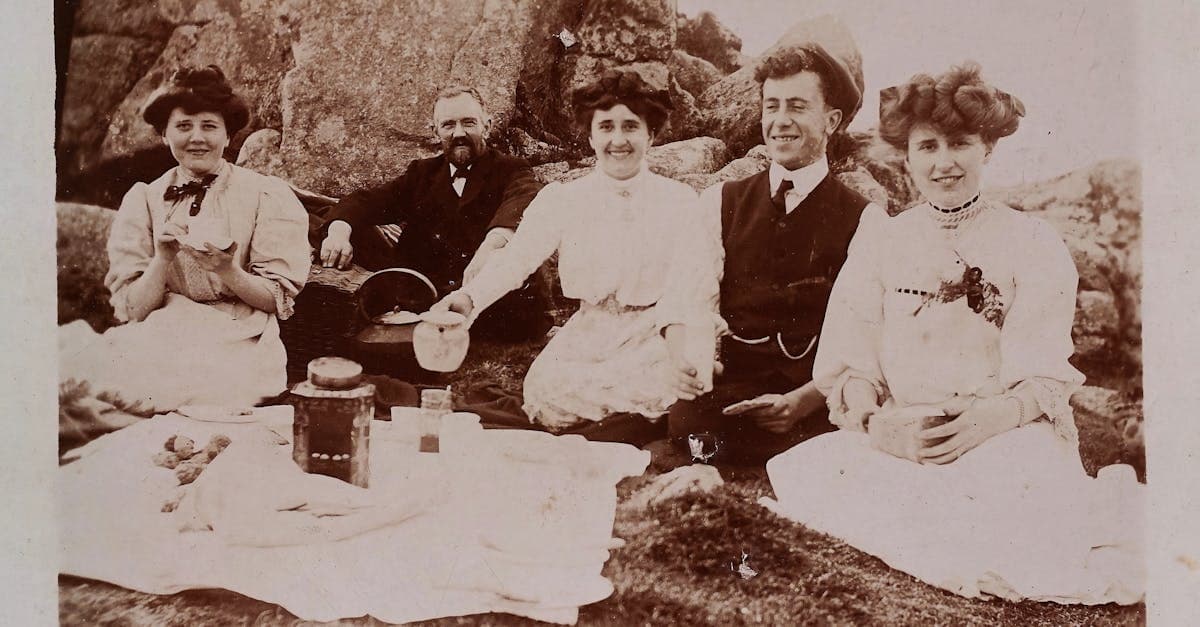
The photographs that survive from the 1900s are among the most fragile objects in any family archive. A studio portrait of a great-grandmother in a high-collared dress, a stiff wedding tableau, a cabinet card of a child posed on a velvet chair — these images were made when photography was still a craft halfway between alchemy and art. They carry a formal, almost ceremonial weight because sitting for a portrait was a rare and expensive event, often the only photograph a person would appear in during their entire life.
What makes 1900s photographs so emotionally charged is also what makes them so vulnerable. The chemistry that fixed those images to paper more than a century ago was never designed to last this long. If you have an Edwardian-era photograph in your possession, you are holding a piece of handmade chemistry that has been slowly failing for over a hundred years. The good news is that AI restoration can reverse a remarkable amount of that failure without ever touching the original print.
How photographs were made in the 1900s
The 1900s was the transition decade when gelatin silver developing-out paper finally overtook the albumen print as the dominant photographic medium. Albumen prints, made by coating paper with egg-white emulsion sensitized with silver nitrate, were still being produced in the early part of the decade, particularly for cabinet cards and cartes de visite. By 1905, most commercial studios had switched to gelatin silver printing-out paper (POP) and then to gelatin silver developing-out paper, which gave the rich neutral blacks we associate with Edwardian portraits.
Platinum prints (platinotypes) were also popular with fine-art photographers like Alfred Stieglitz and Gertrude Käsebier because they produced a matte, long-scale image with extraordinary tonal subtlety. Glass plate negatives were still standard for studio work; roll film was available thanks to Kodak's Brownie (1900), but serious photography remained a glass-plate discipline. Most prints were contact-printed from the negative, meaning print size equaled negative size — which is why so many 1900s portraits are small, dense, and jewel-like.
What damage looks like on 1900s photos
The signature failure mode of a 1900s gelatin silver print is silver mirroring: a bluish metallic sheen that appears in the darkest areas of the image, often along the edges where oxidation started first. Under raking light it looks almost holographic. This is caused by silver ions migrating to the surface of the emulsion and re-depositing as metallic silver — a process accelerated by humidity and atmospheric sulfur.
Albumen prints from the early 1900s show a very different failure: the highlights turn yellow-brown as the egg-white binder oxidizes, and the image itself fades to a warm sepia regardless of its original tone. Foxing — those small reddish-brown spots — is extremely common on any paper-based print from this era because the cotton rag and wood-pulp papers of the period were not pH-neutral. Platinum prints are chemically the most stable of the three, but the paper they were printed on often yellows and foxes around the image.
What AI can restore on 1900s photos
PhotoFlip's restore tool handles silver mirroring, foxing, surface scratches, paper creases, emulsion flaking, and the overall tonal flattening that comes with a century of slow fading. It can rebuild blown-out highlights in albumen prints and recover shadow detail buried under sulfur-induced yellowing. Face structure, eye detail, and fabric texture are usually recoverable even when the print looks almost washed out. For B&W Edwardian portraits, colorize can add period-accurate skin tones, sepia-adjacent browns, and the muted fabric colors of the era.
What AI cannot do: reconstruct content that is physically missing (a torn-away corner, a face eaten by mold), recover areas where the emulsion has lifted entirely, or invent detail beneath heavy silver mirroring that has obliterated the underlying image. If the print is adhered to glass or another photo, leave it to a conservator.
Tips for scanning 1900s photos
Never pull a cabinet card or cased image out of its mount — the backing is often the only thing holding the print flat. Scan cabinet cards whole, mount included, at 600 DPI for an 8x10 working file or 1200 DPI if the print is small and you want to enlarge. Use a flatbed scanner with a clean glass bed and a sheet of clean mylar between the print and the platen if the surface is cracking. Do not use auto-contrast or auto-color correction in your scanner software — capture a flat, neutral scan and let PhotoFlip handle the tonal recovery. For glass plate negatives, scan on a transparency-capable flatbed with the emulsion side down.
How to restore a 1900s photo with PhotoFlip
Frequently Asked Questions
That is silver mirroring, not mold. It happens when silver in the emulsion migrates to the surface and re-deposits as metallic silver, creating a reflective bluish film in the darkest areas of the print. PhotoFlip's restore model recognizes this pattern and recovers the underlying tonal information without you having to touch the original.
Yes, in most cases. Albumen yellowing is a predictable failure of the egg-white binder and it follows consistent color shifts across the print. The AI models the original tonal response and rebuilds neutral density while preserving the warm sepia base that makes Edwardian portraits feel authentic. Heavily cracked albumen emulsions are harder to recover.
No. The mount is usually the only thing keeping the print flat and structurally sound, and separating them risks tearing the image. Scan the whole card as-is. PhotoFlip can crop to the image area later, and keeping the mount intact preserves studio imprints and handwritten inscriptions that are historically valuable.
The cotton and wood-pulp papers of the Edwardian era were not pH-neutral, and spores and metallic impurities trapped in the paper react with humidity over decades to produce reddish-brown spots. Foxing is one of the easiest damage types for AI to remove because it sits on top of the image rather than destroying underlying detail.
Sources
Restore photos from other decades

Ready to restore a photo from the 1900s?
Free preview, no account needed. Download it in full resolution with a free account.
Upload a photo